
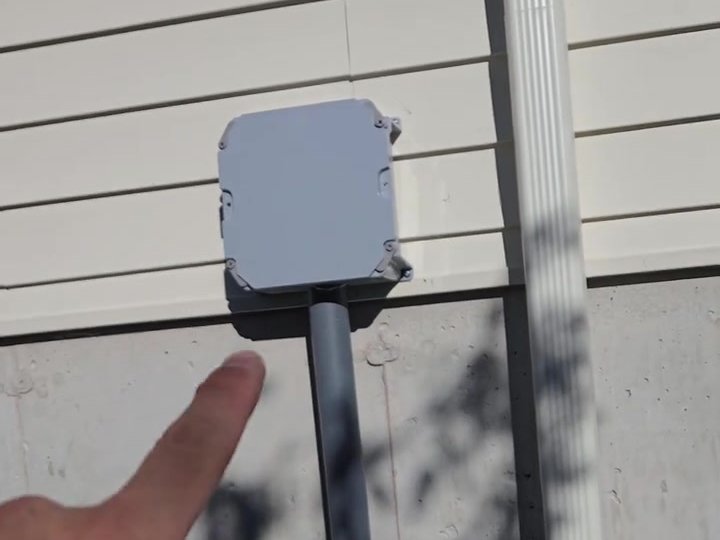
If you are building or gutting a house, run low-voltage cable after framing and before insulation, spray foam and drywall: Cat6 to every camera, access point, TV and doorbell location, plus spare conduit. Label every run and brief the soffit and drywall crews.
If you’re building or gutting a house, there is one short window when running low-voltage cable is easy and cheap: after framing and rough-in, before the insulation and drywall go in. Once spray foam fills the walls and the soffits are closed, adding a camera, an access point or a speaker becomes a job of cutting holes, fishing wire and patching paint. Sometimes it can’t be done cleanly at all.
We do a lot of new-build pre-wiring alongside general contractors in the GTA. Here’s what we recommend running while the walls are open.
Why spray foam makes timing critical
With batt insulation, an installer can sometimes still fish a cable through a finished wall. Closed-cell spray foam sets hard and fills the cavity completely, so there’s nothing to push a cable through. Exterior walls and rim joists, exactly where camera cables need to go, are where spray foam is most common. If it isn’t in the wall before the foam, plan on it going on the outside of the wall instead.
The 4 kinds of cable to run before insulation
1. Camera cable to the soffits and entrances
- One Cat6 cable per camera location, run from the soffit or exterior wall back to where the recorder will live (basement, mechanical room or a closet).
- Typical spots: each corner of the house, the driveway, the front door, the garage and the backyard. A typical home ends up with 3 to 5 cameras; larger homes many more. Run extra cables to spots you might want later; an unused cable is cheap insurance.
- Mark every cable end clearly and tell your soffit installer where they are. More on that below.
2. Network cable for Wi-Fi and wired devices
- Cat6 to a ceiling point on each floor for wireless access points. Ceiling-mounted, wired access points give far better coverage than a router in the basement.
- Cat6 to the TV wall, the home office and anywhere a computer, gaming console or streaming box will sit.
- Everything should come back to one central spot with room for a small rack, a switch and a backup power supply.
3. Doorbell, intercom and alarm wiring
- Cat6 to the front door for a video doorbell or intercom, and to the gate if there is one.
- Alarm wiring for door contacts and keypad locations, if you want a wired system. Wireless alarms like Ajax don’t need it, but a keypad location with power is still useful.
- A cable to the garage door for future smart control.
4. Audio-video and future-proofing
- Speaker wire for in-ceiling or outdoor speakers.
- A conduit behind the main TV location, so HDMI and other cables can be changed later without opening the wall.
- A spare conduit, or a reserved fibre path, from the street side to the mechanical room. Internet technology changes, and a conduit lets you pull new cable in later.
A real example: when the soffit installer sealed the cables in
On one GTA new build, the contractor (who was also the homeowner) had us pre-run seven camera cables to the soffits. Then the soffit crew came through and closed everything up, sealing all seven cable ends inside. What should have been a quick half-day install turned into a rescue: we removed pot lights and opened small sections of soffit to recover every cable, then installed six siren-and-light cameras. (Read the full soffit rescue, with photos.)
The lesson: pre-wiring only works if every trade knows the cables are there. Coil the ends where they’ll be visible, label them, and walk the soffit and drywall crews through the locations, or leave the cables poking through so they can’t be covered.
What a big pre-wire looks like
The largest new build we’ve wired recently took close to a year from rough-in to finish: 23 4K cameras recording to 48 TB of storage, five indoor and two outdoor Wi-Fi access points, a video doorbell, smart lights, locks and thermostats, four Cat6 network ports and a reserved outdoor fibre path. Along the way we ran into buried cables and blocked conduit, which is why we recommend checking every run before the drywall goes up, not after.
Most homes don’t need anything close to that. The principle is the same: decide where devices might go, run cable there while it’s easy, and test it before the walls close.
A simple pre-wire checklist
- Walk the framed house with your installer and mark every camera, access point, TV and speaker location.
- Choose one central equipment location with power and ventilation.
- Run and label every cable; add spares to likely future spots.
- Test each run before insulation.
- Photograph every wall before drywall, so you know where cables are later.
- Brief the insulation, soffit and drywall crews.
Frequently Asked Questions
When exactly should low-voltage pre-wiring happen?
After framing and the electrical and plumbing rough-in, and before insulation, spray foam and drywall. Coordinate the date with your builder or general contractor.
Cat6 or Cat6A?
Cat6 handles cameras, access points and gigabit networking comfortably in a home. Cat6A is worth it for long runs or if you want headroom for faster networking later.
Can you pre-wire if I haven’t chosen cameras yet?
Yes. Network cable is the same regardless of camera brand. You can choose and install the cameras when the house is finished.
Do you work with general contractors?
Yes. We regularly work alongside GCs on new builds and renovations across the GTA and fit into the construction schedule.
Building or renovating? Call (647) 588-9688 or send us your plans before the insulation date. See also: structured cabling · security camera installation · Wi-Fi and networks.